


 შოპმანია

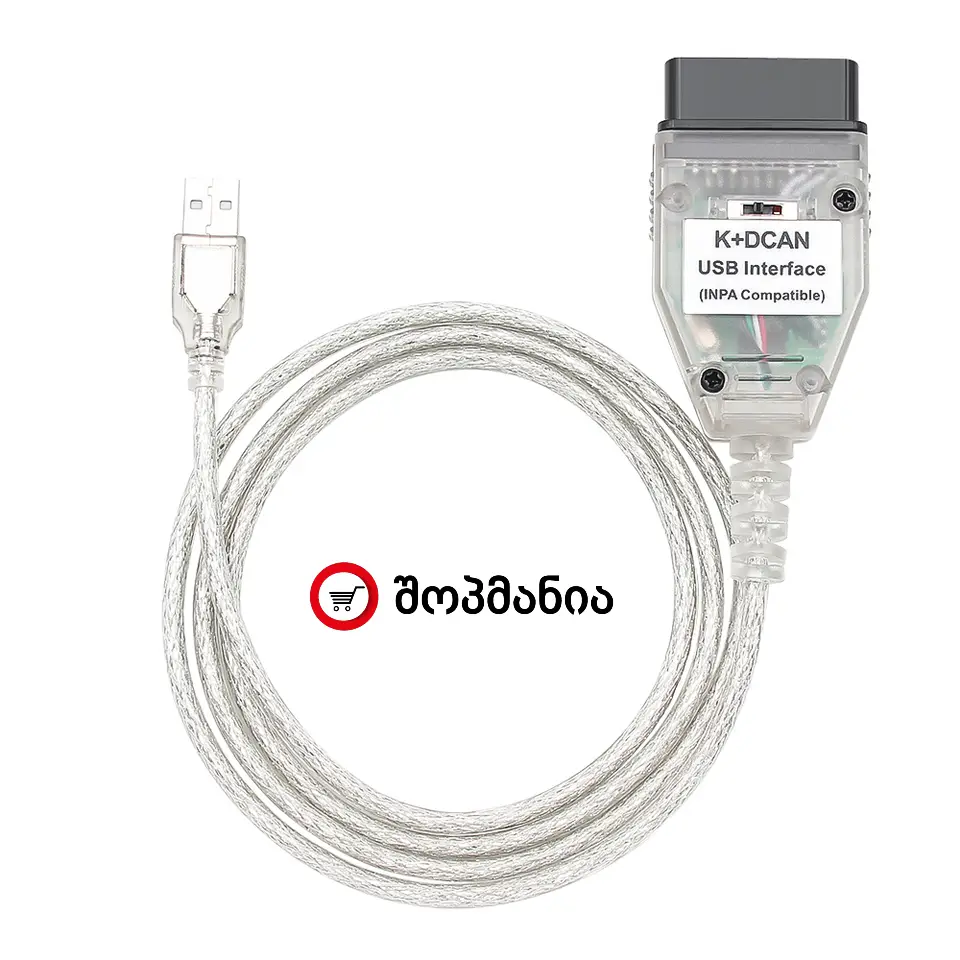
დიაგნოსტიკის აპარატი USB სადენზე (K+CAN / K+DCAN FTDI USB to OBD2)
 მიწოდების პირობები
 ტელ: +995-577-20-30-06

მახასიათებლები:
K+CAN / K+DCAN FTDI USB დიაგნოსტიკის კაბელი განკუთვნილია BMW ავტომობილების კომპიუტერული დიაგნოსტიკისთვის. უზრუნველყოფს არა მხოლოდ OBD დონეზე ინფორმაციას, არამედ მოდულების (ECU) დონეზე წვდომას, რაც საშუალებას გაძლევს გააკეთო სრული შემოწმება, ტესტები, სერვისის განულება და რიგ შემთხვევებში — კოდირება (Coding).
✅ 1) სრული დიაგნოსტიკა (BMW მოდულების დონეზე)
-
შეცდომების კოდების (DTC) წაკითხვა
-
შეცდომების წაშლა და გამართვის შემოწმება
-
შეცდომების ისტორიის/ლოგების ნახვა (თუ პროგრამა აჩვენებს)
-
Freeze Frame — შეცდომის მომენტში დაფიქსირებული პარამეტრები (ზოგ მოდულზე)
✅ 2) Live Data — სენსორების ცოცხალი მონაცემები
-
სენსორების ლაივ პარამეტრები: ბრუნი (RPM), ტემპერატურები, წნევები, ლამბდა, MAF/MAP და სხვა
-
მონაცემების გრაფიკი და ლოგირება (ჩაწერა/შენახვა) (პროგრამის მიხედვით)
✅ 3) აქტივაციის ტესტები (Actuator / Component Tests)
-
ვენტილატორის ტესტი
-
საწვავის ტუმბოს ტესტი
-
EGR / დროსელი / სოლენოიდები — ტესტები (მოდელის მიხედვით)
-
ინჟექტორების ტესტი/ბალანსის შემოწმება (თუ პროგრამა უჭერს)
-
ABS პომპის/სარქველების ტესტი (თუ მოდული და პროგრამა იძლევა)
-
სხვადასხვა რელეების/ვალვების/მექანიზმების ჩართვა ტესტ რეჟიმში
✅ 4) სერვისის ფუნქციები და განულებები (Reset)
-
Oil Service Reset — ზეთის სერვისის განულება
-
CBS Reset (Condition Based Service) — სადაც მხარდაჭერილია
-
ბატარეასთან დაკავშირებული სერვის ფუნქციები (ზოგ მოდელზე)
✅ 5) ECU / მოდულების იდენტიფიკაცია და ინფორმაცია
-
მოდულების მონაცემები: ნომრები, ვერსიები, Coding Index და სხვა
-
VIN-ის და ავტომობილის კონფიგურაციის წაკითხვა (პროგრამის მიხედვით)
✅ 6) Coding — პარამეტრების დაყენება/გადაკეთება (რაც იაფ OBD-ს ხშირად არ შეუძლია)
-
კომფორტის ფუნქციების ჩართვა/გამორთვა (მაგ: ავტოდაკეტვა, key-beep, light settings)
-
განათების პარამეტრები: DRL, Coming/Leaving Home და სხვ.
-
ცენტრალური საკეტის/კარების ლოგიკის მორგება
-
ზოგი გაფრთხილება/სიგნალის პარამეტრი (ზოგჯერ)
-
ფანჯრების/სარკეების ავტომატიკის ქცევა (თუ მოდული იძლევა)
-
კონფიგურაციების ცვლილება შესაბამისი პროგრამებით (მაგ: NCS Expert)
შენიშვნა: Coding არ არის ჩიპ-ტიუნინგი — ეს არის ქარხნული ფუნქციების/ოფციების კონფიგურაციის შეცვლა.
✅ 7) Adaptations / Calibration — ადაპტაციები და კალიბრაციები (სადაც მხარდაჭერილია)
-
დროსელის/თროთლის ადაპტაცია (ზოგ მოდელზე)
-
ტრანსმისიის ადაპტაციების ნახვა ან რეზეტი (მოდელის მიხედვით)
-
Steering Angle Sensor — საბაზისო კალიბრაცია (ზოგ მანქანაზე)
-
Basic Settings სხვადასხვა სენსორზე (პროგრამის მიხედვით)
⚠️ 8) პროგრამირება / Flashing (Firmware Update) — შეზღუდვით
-
ზოგ მოდულზე შესაძლებელია ფლეშინგი/განახლება შესაბამისი პროგრამებით (მაგ: WinKFP / ISTA-P)
-
საჭიროა სტაბილური კვება, სწორი ფაილები და გამოცდილება
-
ყველა თაობაზე/ყველა მოდულზე არ არის რეკომენდებული — ზოგ შემთხვევაში ჯობს ICOM/ENET
✅ 9) მრავალმოდულიანი წვდომა (ბევრად ფართო, ვიდრე იაფ OBD2 დონგლები)
-
ძრავის ბლოკი (DME/DDE)
-
ABS/DSC
-
აირბაგი (SRS)
-
კომფორტის მოდულები (FRM/GM და სხვ.)
-
კლიმატი, ინსტრუმენტები, დამატებითი მოდულები — მანქანის მიხედვით